

Read the Virtual Room – and knowing how to engage with it

Frankie Kemp
15 June 2025
Virtual presentations are usually characterised by a dense slide onslaught or one-way conversation.
It’s common to assume that your 70 slides steeped in paragraphs of text will engage. On the contrary: they repel. With the added complication of mixed audiences, involvement is essential to check understanding.
‘Reading’ the (virtual) room is useful but knowing how to react to what you see is essential. Keeping your communication fluid enables you to react to your listeners so that your purpose lands in the context of their situations.
Thankfully, that doesn’t mean you need to rely on your psychic powers. Whether you’re speaking with engineers, clinicians or any other technical specialist, sharpening your virtual communication skills requires a bit of practice and a few bold nudges in the right place.
1. Use Names
Names are so underused in virtual communication. It’s a low-hanging fruit under-picked and one the simplest ways of establishing connection quickly. We’re hard-wired to react to our own names even in a room of noise. Without the eye cues you have in-person, names give personalisation to your communication.
Use names in the following situations:
- Welcoming them: “Hi Brice, great to see you.” “Hi, Chris, long time, no see.”
- Affirming a statement: “Yes, Tom, that’s the most important factor.”
- Invite someone’s contribution: “Simon, in your experience, is this doable?”
- Interrupting someone: “John, that’s definitely a consideration. As we’re looking at how the tech is affecting the analysis, can we come back to that later?”
2. Discover their ‘Why’
If you’re unsure about who will be on the call, then you can speak to a key player who’ll be present, asking them:
“If there’s one thing that you’ll need to know from our meeting, what will it be?”
That question is gold. Not only do they realise you value their time but also their needs, thereby helping your target your messaging. You may have a mix of listeners – for example clinical and commercial. In this case, it’s a good idea to ask a couple of these people to define their objectives.
3. Engage the Room, Don’t Lecture It
Communication skills—especially for technical people—aren’t just about what you say. It’s what you invite. Firstly, this will help you guide your content to fit their particular needs and, secondly, build engagement, preventing participants from being passive. Most importantly, this will help you match your content to their purpose or ‘why’.
You can use visual tools, which can be deployed even by those with their cameras off (see No. 11, below), such as:
- Chat box messages
- Quick polls
- Videos
- Shared hosting or asking someone else to share an experience (you may ask them before the meeting or private message during the session)
- A “raise hand” reaction (virtual or actual)
- The classic nod, shake, or dramatic eye-roll
- And, occasionally, the old-school “just shout it out”
There are a bunch of other online free interactive tools here, including Mentimeter, that offers anonymous commenting to questions.
And when they respond? Read their words aloud. It validates, encourages, and often sparks more golden input.
Mixing up how people might respond during longer virtual meetings when you have more than around 5 people keeps energy flowing.
4. State the ‘WHY’
At this point, it’ll be easier to then state your purpose of this meeting, and how it will match their objectives. It is essential that you make this is explicit.
Add all the other elements of an effective meeting or presentation introduction, including what you’ll cover and whether you’ll be taking questions. For a comprehensive Opening Structure (and downloadable graphic for ease), go here.
5. Use the most active person in the ‘room’
The first person to speak or react to a chat or poll will likely be the most engaged – or, at least, most forthcoming – person in the room. Ensure you react and encourage them as this will encourage others to do so. Do ensure, though, that you don’t over-focus on them. They’re not your comfort blanket, but the role model for involvement.
6. Bridge the differences
With a mix of technical and non-technical people in your room, ensure you’re not dumbing down or speaking over their heads. The way to do this is to use:
a) analogies and
b) stories such as the Pain, Pivot, Prize structure.
Even the techies will appreciate this as they too need to explain intricate concepts to the non-technical of us.
7. Embrace the Pause
A classic mistake in virtual delivery: asking a question, waiting 0.4 seconds, and then answering it yourself. Put the breaks on the self-reply!
Instead, pause. Really pause. It signals that you’re not just reciting. You’re expecting participation. And when someone does jump in first? Use it: “Cindy, that clearly hit home—what was it that landed for you?”
That kind of communication technique draws in even the quietest quadrant of the screen.
8. Ask Questions
Ask open questions, then respond to what they actually say (weirdly rare). For example, “Yes, Jas, the friction can be an issue.” Follow up questions can unpeel sticking issues, “Where exactly do you find that push-back?”. Follow up questions help to explore an issue in a group but ensure that doesn’t mean you focus on one person and disengage others. Judge the balance. This may mean revisiting an issue in another meeting or with an individual privately.
9. Control the focus
Let’s say while you’re covering a point, you notice someone wants to say something. Add:
“Nat, I’ll come back to you.”
That tiny moment? It tells them: “Your contributions matter.”
10. Cameras for Connection
We all want that warm, engaged room—even if it’s made of pixels. Ask for cameras on and let them know why it matters:
“If you’re able, turning your camera on helps me pick up cues I’d usually get in person. It’s like turning on the subtitles… but for humans.”
Switching the view to ‘gallery’ mode allows you to scan the wider room, picking up on signals that you may want to revisit, such as someone edging to say something, or a furrowed frown.
11. Cameras Off: Use Names
Presenters and meeting hosts tend to avoid addressing the participants with their cameras off, assuming they’ve already checked out. They may be having a bad-hair day, or dribbling noodles down their Lacoste. Say their names as much as you would if they had their cameras on. Very often, you’ll have one of either 4 reactions:
- they’ll reassure you of their presence sporadically by intermittently switching the camera on, then off again (when the traffic light hits green, probably)
- the camera will come on and remain active, if not immediately, it’ll happen at some point during the meeting.
- the participant will choose messaging to interact with you.
- they’ve switched off the camera and then disappeared. They’re now lying on a beach.
The first three scenarios are more likely. So say their names.
Still no cameras? No drama. You’ve got other tools (see No.3 above).
Sometimes they can’t see you or, for whatever reason, you can’t see any of them – for example, in a webinar. This is how you can handle situations like these.
12. React with Discretion to Body Language
Virtual body language can easily be misinterpreted. If they’re looking up, a viewer might interpret this as a sign of irritation. However, the participant might be looking at the top of a high screen.
- Firstly, if you have a second screen that means your eyes divert from them, state this: “If I look away, it’s at my second screen.”
The implication is that you expect them to be focused on the task in hand, even if they’re not looking at the camera.
- Did someone just sigh? Rest their head in their hands? Narrow their eyes at slide 6? Drop a private message:
“Spotted a raised eyebrow—was that a curious one or a confused one?”
This kind of observation sharpens your own communication awareness and models it for the group.
13. ‘Disengaged’ Body Language
If you don’t feel comfortable reacting to body language that you interpret as negative, there are several other approaches open:
- using the anonymised feedback tools such as Mentimeter (see no. 5 above)
- engaging others with general comments using names and
- a non-critical response to their comments – even cynical comments – helps to bring them on-side, gently and indirectly.
- describe what you see – don’t guess what it means:
Not: “Darren, you seem thrilled.” Better: “Darren, you’re smiling.”
(You’re acknowledging engagement without putting words in anyone’s mouth. Of course, you may have embarrassed Darren as he’s scrolling through on his Instagram feed. Now he knows he’s been spotted, ‘bye bye Insta.)
14. Call Out the Elephant—Nicely
Ever felt resistance bubbling in a room but didn’t know how to name it? Do it gently and openly:
“Some people have said they’re unsure how this applies if you’re not in a clinical role. That’s totally valid—let’s unpick it now.”
It normalises uncertainty and prevents people quietly checking out.
You can also ask:
“Some people think this would be very difficult to apply to their particular scenarios. Anyone want to share such challenges that would make this challenging?”
This kind of question is invaluable as a communication skills tool, giving everyone permission to explore instead of pretending they’ve got it all figured out.
15. Leave Space for Curiosity
Allow time to take room for questions, not just content. To encourage those who might be less forthcoming, you can ask:
“I imagine some of you are wondering how this applies when you’re mid-deadline or juggling systems. What difficulties are on your mind?”
If you can’t predict what questions others may have, ask:
“You may be wondering ‘What’s the next step?'” [pause].
Then, end with the Action…
16. End with Action
Virtual Meetings can end with a fizzle rather than a spark. Ensure that you take these three steps before you click ‘End Meeting’:
- Summarise what you’ve covered, remind them of what’s in this for them;
- Allow for questions;
- End with a simple and specific action step.
Communication skills training often starts here: make people feel seen. Even in a digital space, little actions make all the difference between engagement and disconnection. Use names, ask questions, mix up how you involve people and adapt to what you see.
In Summary
As a handy visual, you can pin this up, laminate it to use as a mouse mat or have it printed on a t-shirt – if you’re not too worried about your personal image:
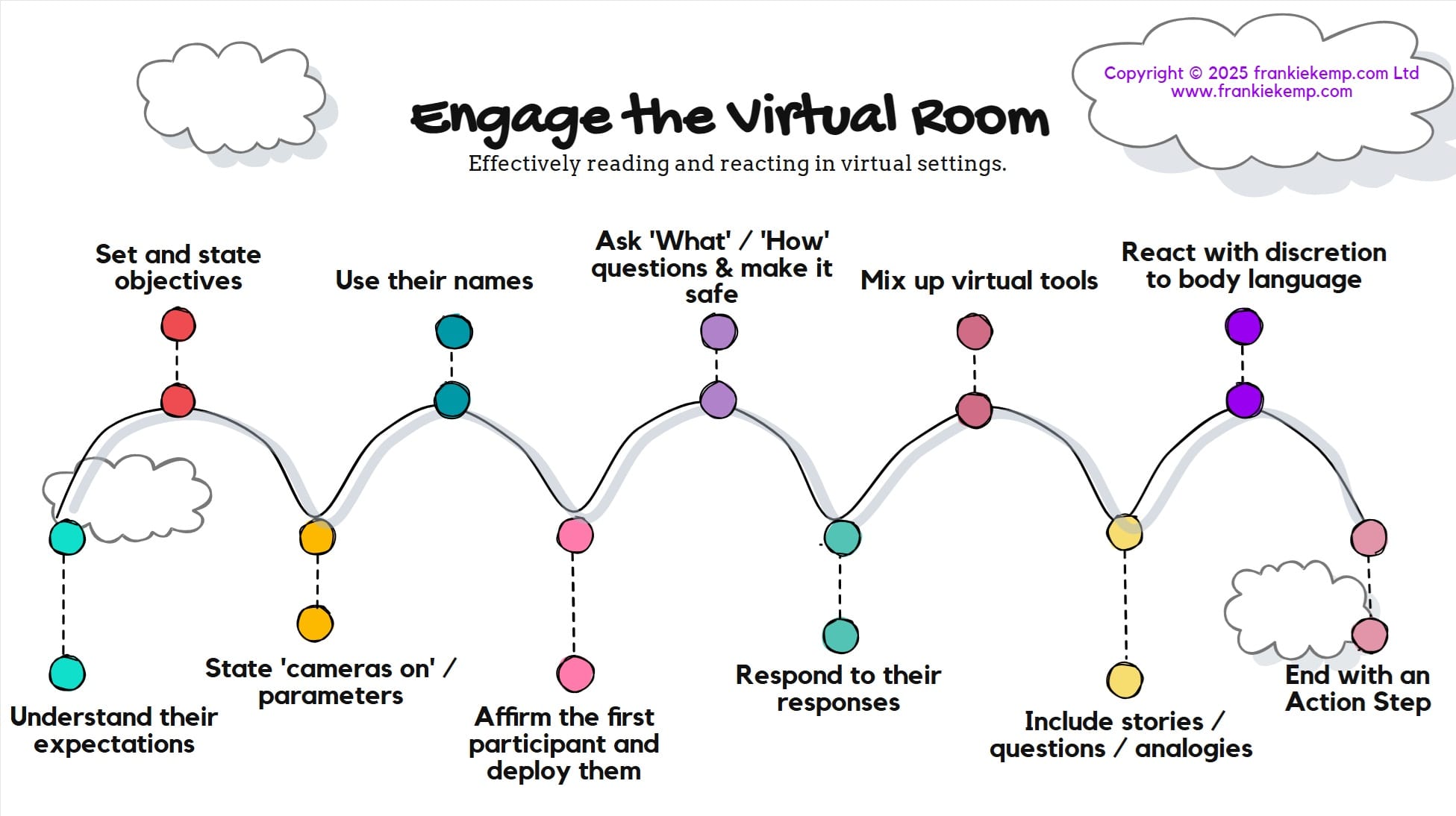
Your Action Steps
- Ensure you know what they’re expecting from you (their ‘why’);
- Set and State objectives and expectations;
- State cameras on and any other parameters;
- Use their names;
- Deploy the most active person in the room;
- Ask ‘What’ and ‘How’ questions and make it safe (anonymity/ normalisation);
- Respond to their responses;
- Mix up the tools;
- Include stories and analogies to engage;
- React with discretion to body language;
- End with an Action Step.
Looking to become a Communication Ninja? Whether this is online or in person, look at Considering improving your ability to connect with others? If you want to use fewer slides and more engagement, Look at my communication skills training to see how I work with technical specialists.
Get in touch with me here to see how you – or your people – can become less vanilla and more THRILLER.


Leave a Reply